
The Six Order Types
Each card plays one type out on candles. Press a card to load it into the chart above.
- order placed
- stop price
- stop price traded
- filled
All Six in One Table
| Order | Where it sits | Triggers when | Then |
|---|---|---|---|
| Buy limit | Below the Ask | The Ask falls to the price | Fills at the price or better |
| Sell limit | Above the Bid | The Bid rises to the price | Fills at the price or better |
| Buy stop | Above the Ask | The Ask rises to the price | A market buy at the next price |
| Sell stop | Below the Bid | The Bid falls to the price | A market sell at the next price |
| Buy stop limit (MT5) | Stop above the Ask, limit below the stop | The Ask rises to the stop price | A buy limit goes in at the limit price |
| Sell stop limit (MT5) | Stop below the Bid, limit above the stop | The Bid falls to the stop price | A sell limit goes in at the limit price |
Buy or Sell, Limit or Stop
Two questions pick the type: do you buy or sell, and do you want a better price or a breakout?
A limit fills at its price or better, or not at all.
A stop becomes a market order when it triggers and fills at the next price available.
Wrong Side? Refused. A buy limit above the Ask would fill at once, so MetaTrader rejects the price. The chart does too, and says why.
Two Prices: The Bid and the Ask
- BidWhere you sell. MetaTrader draws its candles from it.
- AskWhere you buy. It sits the spread above the Bid.
- SpreadThe gap between them: 1.2 pips in these examples.
So a buy order waits for the Ask and a sell order waits for the Bid. That catches people out with buy orders, because the candles show only the Bid.
- The Bid candle touches your buy limit at 1.08350. The Ask is still 1.2 pips higher, at 1.08362: not filled.
- The Bid goes on to 1.08338, so the Ask reaches 1.08350: filled. The candle goes 1.2 pips past your line.
The spread widens? The Ask rises while the Bid stays where it was, so a buy stop can trigger with hardly a move on the chart.
The Stop-Limit in Two Steps
For a breakout you want to join only on a pullback. EURUSD trades at 1.08500 and you expect a move up through 1.08650, but you do not want to chase it: a buy stop limit with the stop price 1.08650 and the limit price 1.08580.
- 1The BreakoutThe Ask reaches 1.08650. Only now does a buy limit go in at 1.08580.
- 2The PullbackThe price comes back to 1.08580: filled there.
- 3Or No PullbackIt keeps going: no fill at all. That is the trade-off.
The limit order exists only after the stop price has traded, so a stop-limit never fills in the same move that triggers it.
MetaTrader 4: Four Types
- Buy Limit
- Sell Limit
- Buy Stop
- Sell Stop
- Buy Stop Limit
- Sell Stop Limit
- Buy Limit
- Sell Limit
- Buy Stop
- Sell Stop
- Buy Stop Limit held by the panel
- Sell Stop Limit held by the panel
MetaTrader 4 has the four basic pending orders and no stop-limit. Stopline Trade Manager, in both editions, adds one on MT4 by holding the order inside the panel: when the stop price trades, it sends the limit order to the broker.
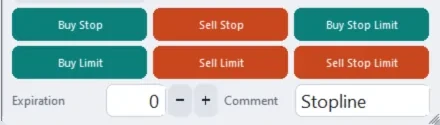
Until the stop price trades, the order exists only on your computer: the terminal has to stay running and connected.
Expiry and Fill Policy
How Long It Waits
A pending order can have a lifetime. MetaTrader 5 offers four expiration types:
- Good Till CanceledNo end: it waits until you delete it.
- IntradayCancels the order at the end of the current trading session.
- Specified TimeCancels it at a time you set.
- DateCancels it at the end of a day you set.
MetaTrader 4 lets you set an expiry date and time.
How Much It Takes
MetaTrader 5's fill policies say what happens when the full volume is not available at the price:
- Fill or KillTakes all of it, or nothing.
- Immediate or CancelTakes what is there now and cancels the rest.
- ReturnTakes what is there now. The rest stays as an order.
Which of them a symbol allows is set by the broker.
The Stops Level and Invalid Stops
A pending order may not sit closer to the price than the symbol's stops level, a distance in points that your broker sets.
- The same limit applies to a stop loss and a take profit
- Zero on some accounts
- The Specification window shows it
The chart above does not model it: its lines can sit any distance from the price on the right side.
Gaps and Slippage
The chart above does not model slippage: a stop fills exactly at its price there. Real fills depend on your broker and the moment.
Check It in MetaTrader
F9: New Order › Type: Pending Order › MT5 lists six, MT4 four
The window refuses a price on the wrong side of the market. Try a buy limit above the Ask, then try the same on the chart above.
Market Watch › right-click the symbol › Specification
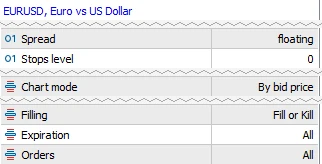 12345
12345- Stops level: the closest a pending order may sit, in points. Zero on this account.
- Chart mode: by bid price, so the candles are the Bid.
- Filling: the fill policies the symbol allows.
- Expiration: the expiry types it allows.
- Orders: the order types it allows.
Every row of the window is explained in Symbol Specification in MT5 and MT4.
Source: MetaTrader 5 help, Market Watch, read 20 October 2026, and the MetaTrader 5 terminal on MetaQuotes' demo server (EURUSD) on 20 October 2026.
Test Yourself
You got 0 of 3.
Both editions place every pending type from the panel. Stopline Trade Manager and Stopline Trade Manager EZ also turn a line dragged away from the price into the matching pending type, and hold a stop-limit on MT4 until its stop price trades.
Questions
What Is the Difference Between a Buy Limit and a Buy Stop?
A buy limit sits below the market and fills when the Ask falls to it, so you buy cheaper than now. A buy stop sits above the market and triggers when the Ask rises to it, so you buy a breakout at the next available price. One waits for a pullback, the other for strength.
Does MetaTrader 4 Have a Stop-Limit Order?
No. MetaTrader 4 has buy limit, buy stop, sell limit and sell stop, and MetaTrader 5 adds the buy stop limit and the sell stop limit. Stopline Trade Manager holds a stop-limit inside its panel on MT4 and sends the limit order when the stop price trades, so the terminal must stay running until then.
Why Does My Pending Order Show Invalid Stops?
The price is closer to the market than the symbol's stops level, or on the wrong side of it. Your broker sets the stops level in points, and the Specification window shows it. Move the order further from the price, or check which side of the Ask or the Bid it belongs on.
Does a Buy Limit Fill When the Chart Touches My Line?
Not always. The chart is drawn from the Bid, and a buy limit fills when the Ask reaches it, which is the spread higher. A candle that only touches your line has not filled the order; the Bid candle has to go below the line by about the spread.
Can a Stop Order Fill at a Worse Price Than I Set?
Yes. A triggered stop becomes a market order and fills at the next price available. In a fast market or after a gap that can be worse than your stop price, which is slippage. A limit order fills at its price or better, or not at all.
More Free Tools
One-Click Trading in MT5 and MT4 Compared With a Trade Panel
MetaTrader's own One Click Trading, and what a trade panel adds when you send orders.