
Trade Manager and Trading Panel for MetaTrader 5 and MetaTrader 4
Your entry. Your exit. Your way.
A trading panel for MetaTrader 5 and 4. Set the entry, stop and targets on the chart or in the panel, size the lot from your risk or type it, and send any order type. Then close in one press, or let partial closes, breakeven and a trailing stop run by the rules you set.
EZ US$30 · Stopline Trade Manager US$49on the MQL5 Market
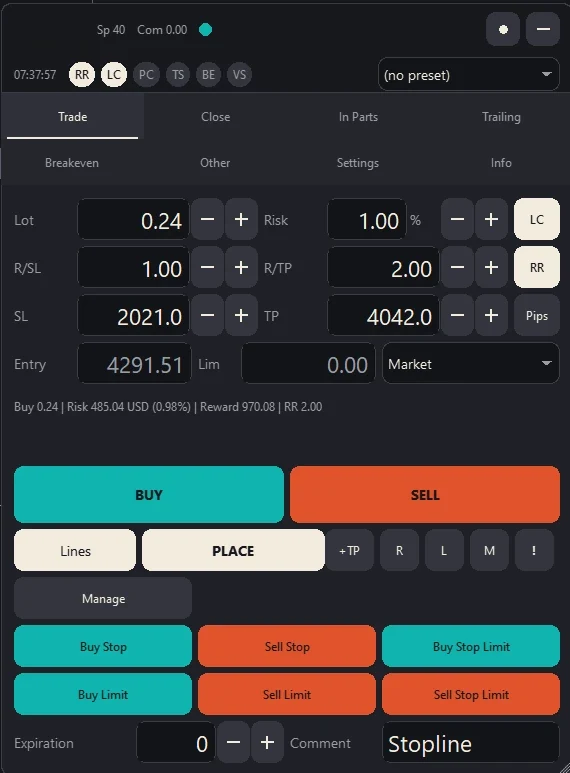
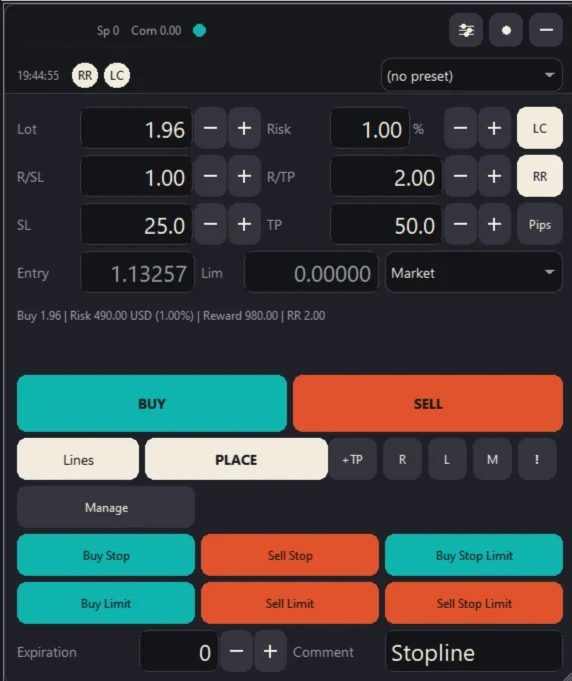
Each Edition in 60 Seconds
Stopline Trade Manager EZ0:57
The compact edition in one minute: set the trade on the chart or in the panel, the lot comes from your risk, and every exit is one press away.
Read the film
Ask ten traders how they trade, and you'll get eleven answers. Stopline Trade Manager EZ is a compact panel for MetaTrader 5 and 4, made by traders, for traders, and it's built for every one of them.
Your entry comes first. Put the entry, stop and up to five targets on the chart or in the panel, and the lot comes from your risk. Lock the reward-to-risk, and the target follows the stop. Send it at market or as any pending order, with a quick check or one click.
Your exit is just as simple. Each target closes its share by itself, and every exit is one press away. Tick the positions you want, and the buttons act on those alone.
And your way means your rules. Daily loss, trade count and exposure limits make sure you stick to them. Even the hotkeys are yours, for anyone who never lets go of the keyboard.
There's more than fits in a minute, and it's all on the MQL5 Market. Your entry. Your exit. Your way.
Stopline Trade Manager0:57
The full edition in one minute: set the trade on the chart or in the panel, the lot comes from your risk, and the exit runs by the rules you set.
Read the film
Ask ten traders how they trade, and you'll get eleven answers. Stopline Trade Manager is a trade panel for MetaTrader 5 and 4, made by traders, for traders, and it's built for every one of them.
Your entry comes first. Set the entry, stop and up to five targets on the chart or in the panel, and the lot comes from your risk. Lock the reward-to-risk, and the target follows the stop. Send it at market, as any pending order, or as an OCO pair.
Your exit follows the rules you set. Targets close their shares, and the stop can move to breakeven, then trail in one of seven ways. Want a hand on the wheel? Close part of it from the chart.
And your way means your rules. Daily loss, trade count and exposure limits make sure you stick to them. Even the hotkeys are yours, for anyone who never lets go of the keyboard.
There's more than fits in a minute, and it's all on the MQL5 Market. Your entry. Your exit. Your way.
Both films are in English, with captions in the picture. "Read the film" shows the words.
Look Inside the Panel
Stopline Trade Manager sits on your MetaTrader chart: it works out the lot, places the order and manages the position after the entry. Its tabs are laid out as they are in MetaTrader; EZ keeps the essentials on one page, with a Manage mode for the exit. It opens no trade by itself: every entry starts with you.
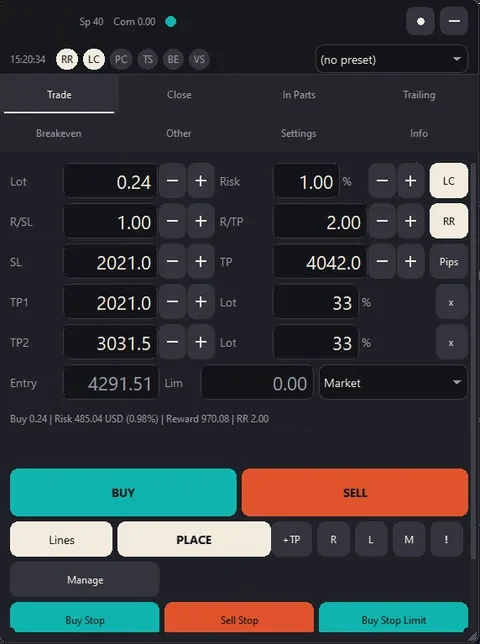
Trade tab
Sizing and Order Entry
- Entry, stop and up to five targets, as lines on the chart or as numbers in the panel.
- The lot from your risk and the stop, from nine risk bases, with a reward-to-risk lock.
- Every order type including stop-limit, from the lines, a list or the keyboard, with a confirmation or in one click.
In EZ: the same sizing and order entry, on its one page.
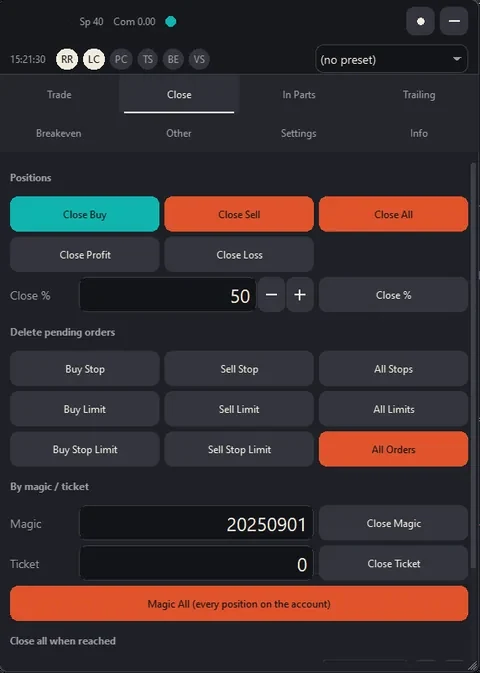
Close tab
Close in One Press
- Close the buys, the sells, everything, the profitable or the losing positions.
- Close a percentage of every position, or by magic number or ticket.
- Close everything when the total profit or loss reaches your number.
- Delete pending orders by type.
In EZ: the buys, the sells, all or a percentage, with the Manage buttons.
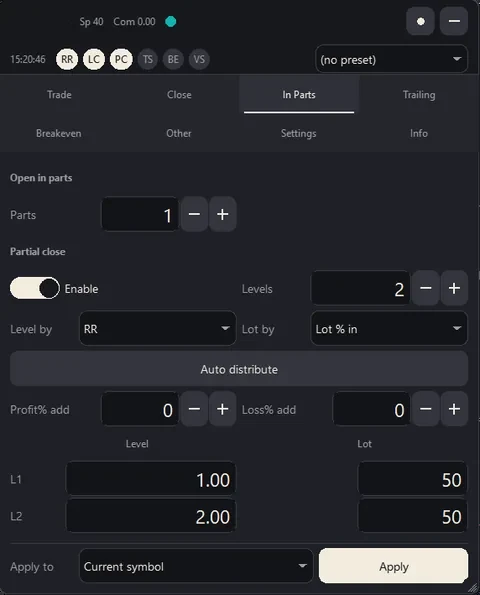
In Parts tab
Partial Close in Up to Ten Levels
- Levels by price, points, reward-to-risk, percent change, or a percent of the take profit or stop loss.
- Each level closes its own share of the lot.
- Levels already closed are remembered across restarts.
In EZ: Close % by hand; each take profit level closes its own share.
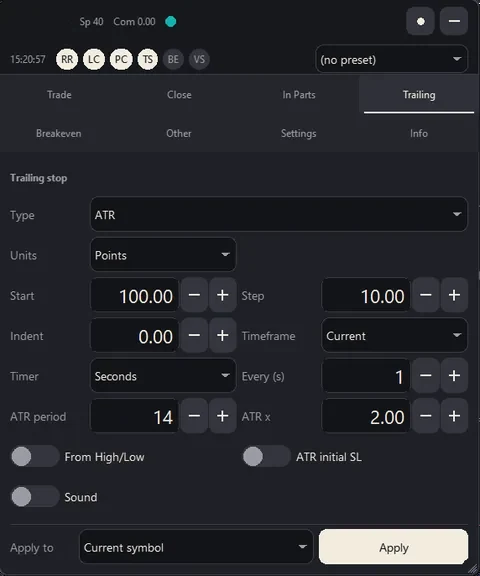
Trailing tab
Trailing Stop, Seven Types
- Fixed distance, fractals, moving average, Parabolic SAR, ATR, the last partial-close level or the previous bar.
- Start only after the trade has moved; step, indent, every second or on each new bar.
- The stop only moves in your favour.
Not in EZ.
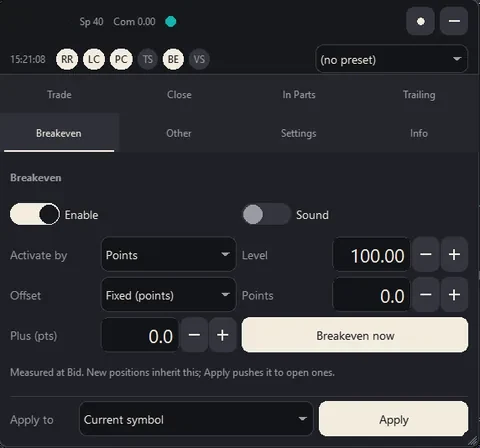
Breakeven tab
Breakeven in Four Modes
- After a number of points, a reward-to-risk ratio, a percent change or a percent of the take profit.
- Offset fixed, or spread plus commission, with an extra amount if you want one.
- Breakeven now from the tab, the position menu or a key.
In EZ: on demand, from a button, a key or the position menu.
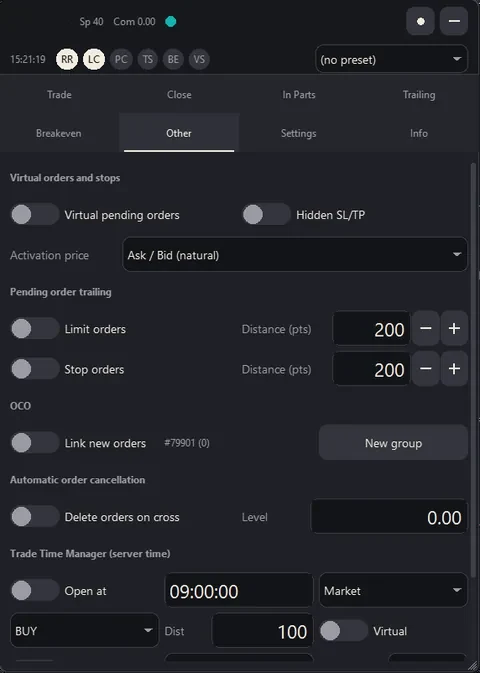
Other tab
Virtual Orders, OCO and a Time Manager
- Virtual pending orders and a hidden stop loss and take profit, kept in the panel until the price gets there.
- OCO groups: the first order that fills cancels the others.
- An automatic cancellation level, order trailing, and a trade time manager that opens or closes at the times you set.
Not in EZ.
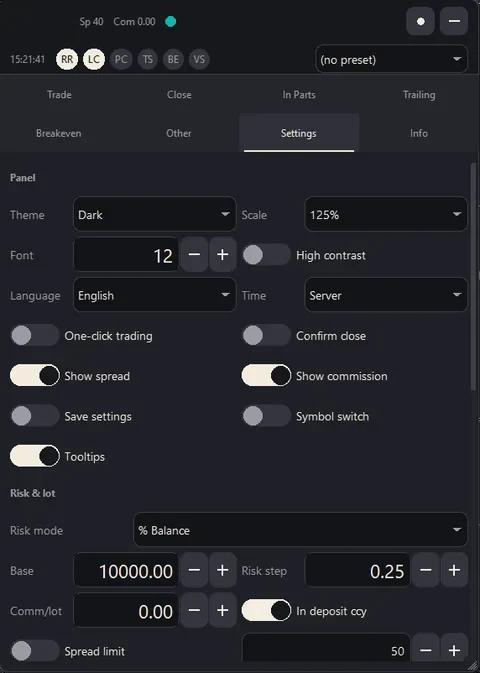
Settings tab
Your Limits, Your Look
- A daily loss limit, maximum open trades, exposure per symbol, spread and lot limits.
- Four themes, high contrast, nine languages and four panel sizes.
- Presets, settings saved per symbol and hotkeys you choose.
- One-click trading, or a confirmation before every order.
In EZ: the theme, size, language and presets on its settings page; the limits in the input dialog.
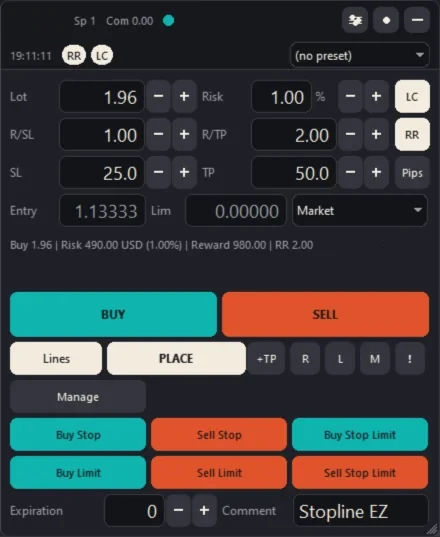
Stopline Trade Manager EZ
Everything for the Entry, on One Page
- Lot size from your risk and the stop distance.
- Every order type, set on the chart or in the panel.
- Up to five take profit levels, each closing its own share.
The theme, size, language and presets sit on its settings page.
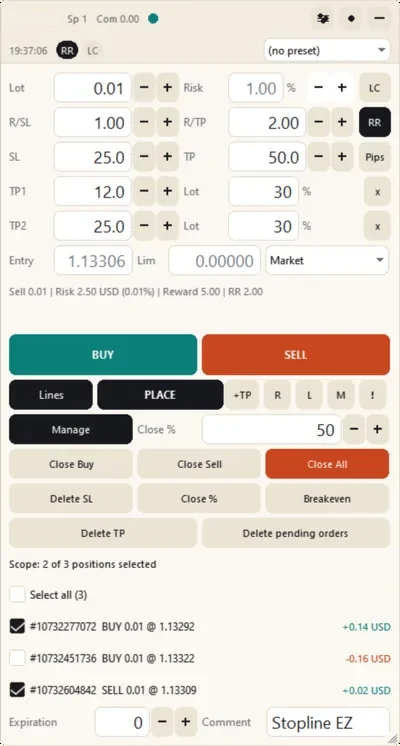
Stopline Trade Manager EZ
One Press at a Time
- Close the buys, the sells, everything or a percentage.
- Move the stop to breakeven; remove the stop or the target.
- On every position, or only the ones you tick.
Each take profit level closes its own share when the price reaches it.
Checked Before an Order Goes Out
A Lot That Does Not Match Your Risk
A 1 % trade never quietly becomes 1.3 %. You type the risk and place the stop; the lot comes from the tick value your account actually books and is rounded down to the symbol's volume step. When the symbol's published tick value differs, the panel tells you.
The Market Order You Did Not Mean
Buy and Sell are greyed out while you set up a pending order. A press against the planned direction flips the plan first instead of sending. A confirmation shows the lot, risk, stop and target before anything goes out.
A Stop That Never Got Set
Every order from the panel carries the stop you placed, and the confirmation shows it before anything is sent.
An Order the Account Cannot Carry
Every order is checked against the account first: the panel refuses one the account cannot carry and says why.
Limits You Set Once
Daily Loss Limit
Blocks new entries for the rest of the day once the loss reaches your limit, in percent or money. It closes nothing.
Maximum Open Trades
Refuses a new entry above your limit.
Exposure per Symbol
Refuses an order that would take the symbol's lots above your limit.
Spread Limit
Holds entries while the spread is wider than your limit.
Lot Limit
Keeps the lot inside your minimum and maximum and says when it applies.
Health Dot
Shows when Algo Trading is off, the connection is lost or the daily limit is reached.
Choose Your Edition
The buttons open the purchase on mql5.com, where you sign in or create a free MQL5 account.

Stopline Trade Manager EZ
Every exit one press away, in one compact window.
US$30one-time payment
- Lot size from your risk and the stop distance
- Every order type, set on the chart or in the panel
- Up to 5 take profit levels, each closing its own share
- The Manage buttons: close, close a percentage, breakeven

Stopline Trade Manager
The exit runs by the rules you set.
US$49one-time payment, launch price for the first 10 copies, then US$99
- Everything in EZ, plus exits that run on their own: partial close at up to 10 levels, 7 trailing stop types, breakeven in 4 modes
- Virtual and hidden orders, OCO, a trade time manager, statistics and a journal
Sold on the MQL5 Market. MetaTrader 5 and MetaTrader 4 are separate products: buy the one for your terminal. Each purchase works on 10 computers, and updates are free. Terms and licence
Stopline Trade Manager is software. It sizes and places the orders you set up and manages them by the rules you choose. It offers no trading account, holds no money and gives no advice or trade recommendations: you decide every trade. Trading carries a risk of loss. A stop or a daily loss limit can act at a worse price than the one you set, for example when the price gaps.
Compare the two editions, line by line
Both size and place a trade the same way. The difference is what runs after the entry, and how much window you want.
| Function | Stopline Trade Manager EZ | Stopline Trade Manager |
|---|---|---|
| Window | One page, plus a settings page for the theme, size, language and presets | Eight tabs |
| Lot from risk | Nine risk bases, lot limit, commission and spread | The same |
| Order types | Every order type, from the lines, a list or the keyboard | The same |
| Take profit levels | Up to five | Up to five |
| Closing | Buys, sells, all or a percentage; remove the stop loss, the take profit or the pending orders | Buys, sells, all, profitable, losing, a percentage or by ticket; everything at a total profit or loss |
| Partial close | By hand with Close %, plus up to five take profit levels that close their own share | Up to ten automatic levels |
| Breakeven | On demand: a button, a key or the position menu | Automatic in four modes, and on demand |
| Trailing stop | None | Seven types |
| Virtual orders, hidden stops, OCO, time manager | None | Yes |
| Alerts | Price lines | Price lines and your own drawn lines |
| Limits | Daily loss, open trades, exposure, spread and lot limits | The same |
| Statistics, journal, screenshots | None | Yes |
| Price | US$30, one-time payment | US$49, one-time payment (launch price for the first 10 copies, then US$99); rent US$30 for 1 month |
Questions Before You Buy
Which edition do I need?
Both size and place a trade the same way: the lot from your risk and the stop, every order type, up to five take profit levels and a confirmation before every order. Take EZ if you close your trades yourself and want one compact window. Take Stopline Trade Manager if you want partial closes, a trailing stop and breakeven to run by rules you set, or need virtual orders, hidden stops, OCO or statistics.
How do I buy and install it?
The buttons open the purchase on the MQL5 Market, where you pay with an MQL5 account. Then, in MetaTrader, open the Market tab of the Toolbox (MT5) or of the Terminal window (MT4), select Purchased and press Install. Each purchase works on 10 computers, and updates are free.
MT5 or MT4: which do I need?
The one for the terminal you trade in. Each edition is two products, one for MetaTrader 5 and one for MetaTrader 4, with the same panel; a purchase of one does not include the other.
Can I try it before I pay?
Stopline Trade Manager: rent it for 1 month for US$30 and use it on your own live or demo charts. Rent it on its product page: MT5 · MT4. EZ is sold only as a purchase. The free demo on the MQL5 Market runs only in the Strategy Tester, where MetaTrader passes no mouse clicks to a panel, so you can look at it there but not use it.
Can I get a refund?
The MQL5 Market does not refund purchases, so rent Stopline Trade Manager first if you want to try it on your charts. If something does not work as described, write in the product's Comments: the MQL5 rules let you ask for a fix within a month of purchase, and we answer within 24 hours.
Does it open trades by itself?
No. Every entry starts with you. The one exception is a scheduled open you set up yourself in Stopline Trade Manager's trade time manager.
What does it not do?
It gives no advice or trade recommendations and runs no strategy of its own. It offers no trading account and holds no money. Every entry starts with you.
What does it run on?
MetaTrader 5 or MetaTrader 4 on Windows, or MetaQuotes' MetaTrader for macOS (each Mac counts as one computer). Each edition is a separate product for MT5 and for MT4. The help pages cover installation, every control and how to uninstall.
Who makes it and how do I reach you?
Brendon, through BSM Equity Pty Ltd in Australia. Write to support@stoplinetrademanager.com or in the product's Comments tab on MQL5; we answer within 24 hours. About and contact
Will it touch my other trades?
Only when you ask it to. Breakeven, trailing, partial closes and the Close buttons act only on the positions with the panel's own magic number, so other trades on the account are left alone. A few settings reach further, each your own choice, such as managing every position or closing by ticket. It never changes your own chart drawings.
Your entry. Your exit. Your way.
EZ US$30, one-time payment. Stopline Trade Manager US$49, one-time payment (launch price for the first 10 copies, then US$99).
Stopline Trade Manager EZ
Stopline Trade Manager