
Gold, 10,000 USD account, 1 % risk
lots
At the stop this risks .
Lot Size Calculator
The lot for your risk and your stop, for 43 symbols and any account currency, rounded down to the volume step.
Open the CalculatorHome › Tools
Free, in your browser, nothing to install
Four free tools for MetaTrader traders: a lot size calculator for currency pairs, gold, indices and oil; the Red Folder Calendar of high-impact releases in your time zone; the trading sessions of Sydney, Tokyo, London and New York on one graph; and an order type visualiser. They run in your browser, with no sign-up.
The Sessions Today, Your Time (your time zone)
Each session runs from 08:00 to 17:00 in its own city, Monday to Friday.
Next Red Folder Release
The rate decisions of eight central banks and the headline jobs, inflation and GDP releases, with the dates of the weeks ahead.
Each card is a small working piece of the full tool. Play with it, then open the real thing.
Gold, 10,000 USD account, 1 % risk
lots
At the stop this risks .
The lot for your risk and your stop, for 43 symbols and any account currency, rounded down to the volume step.
Open the CalculatorNext red folder release
Soon
The next rate decision or headline release, in your time zone.
Rate decisions and the headline jobs, inflation and GDP releases, from the official schedules, with a countdown and calendar files.
Open the CalendarThe four cities right now
Sydney, Tokyo, London and New York on one 24-hour graph in your time zone, with the overlaps shaded.
Open the SessionsA buy limit waits below the price
Buy limit, buy stop, the stop-limit and the rest played out on a chart: see when each order triggers and fills.
Open the VisualiserWhere each tool and guide fits, from the first coffee to the last trade.
Know which markets are awake and which releases can move your symbol.
Size the lot from the money you accept to lose, and pick the order that waits for your price.
Take part of the profit, protect the rest, let a winner run.
Decide in advance how much a bad day may cost, and stop there.
Open a tool and use it. No account, no email.
No cookie, nothing loaded from another site: the tools run on data served with this site (privacy notice).
Copy a link to keep a tool's inputs, or turn on Remember my settings on this device; turn it off and they are deleted.
The tools show how the numbers and the orders work. They give no signals and no forecasts, and your broker's figures always come first.
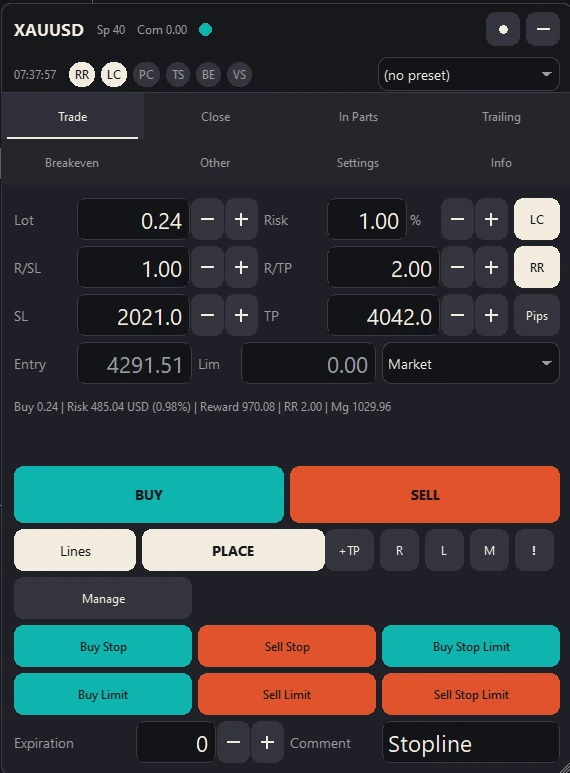
Stopline Trade Manager and Stopline Trade Manager EZ size the lot from your risk and your stop, set on the chart or in the panel, and send every order type. EZ puts every exit one press away; the full edition also runs the exit by rules you set.