
Stopline Trade Manager › Guides
Multiple take profits in MT5 and MT4: TP1, TP2, TP3
MetaTrader gives each position one take profit. To bank part of a trade at a first target and let the rest run, you split the trade, close part of it yourself, or let an Expert Advisor close the parts for you.
One position, one take profit
The order window of MetaTrader 5 and MetaTrader 4 has one take-profit field per position. On a hedging account (every MetaTrader 4 account, and many MetaTrader 5 accounts) each order is its own position with its own stop and target. On a MetaTrader 5 netting account all trades on a symbol merge into one position, so there is only ever one take profit for that symbol.
Without a tool
Several orders, each with its own target
Split the trade into two or three orders and give each one its own take profit. It works on hedging accounts, but you have to size every order so that the total risk is still the risk you planned, and when you move the stop you move it on every order. On a netting account the orders merge, so this does not work at all.
Closing part of the position by hand
The order window can close a smaller volume than the whole position. It needs you at the screen when the price reaches the level, and on MetaTrader 4 the rest of the position gets a new ticket after each partial close.
Take-profit levels on one position
The third way keeps one position and one final take profit, and adds levels in between: each level has a price and a share of the lot, and when the price reaches it, that share is closed. Whatever remains runs to the final take profit, where the broker closes it like any other target. The levels themselves are closed by the Expert Advisor, so the terminal has to be running and connected for them.
A worked example on EURUSD
An account of 10,000 USD risking 1 %, a buy of 0.40 lots at 1.10000 with the stop 25 pips below (the example of the position size guide). One pip on 1.00 lot is worth 10 USD.
| Level | Price (distance) | Share of the lot | Closes | Profit on that part |
|---|---|---|---|---|
| TP1 | 1.10250 (25 pips) | 50 % | 0.20 lots | 50 USD |
| TP2 | 1.10500 (50 pips) | 25 % | 0.10 lots | 50 USD |
| Final take profit | 1.10750 (75 pips) | the rest, 25 % | 0.10 lots | 75 USD |
If the price goes all the way, the trade makes 175 USD against a risk of 100 USD. If it reaches TP1 and then turns back to the stop, the 50 USD from TP1 and the 50 USD lost on the remaining 0.20 lots cancel out, unless the stop was moved to breakeven after TP1.
How Stopline Trade Manager EZ and Stopline Trade Manager do it
- +TP adds a level below the stop loss and take profit fields: a distance in pips (or a price) and a share of the lot. Up to five levels, TP1 to TP5, kept in order with the nearest first.
- Each level is a dotted line on the chart with its share on the label; drag it to move the level. The final take profit gets whatever share is left.
- The lot of the whole trade still comes from your risk and the stop distance, and the confirmation shows the trade before anything is sent.
- An open position keeps the levels it was opened with, drawn as
TP1 #ticketlines you can move for that position alone. Changing the panel later does not change a running trade. - On MetaTrader 4 the Expert Advisor follows the position to its new ticket after each partial close.
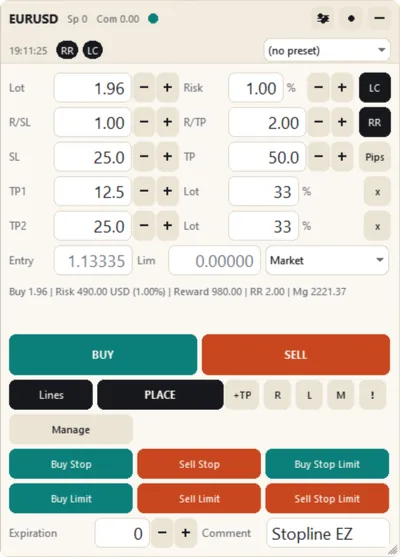
Both editions have take-profit levels, on MetaTrader 5 and MetaTrader 4. Stopline Trade Manager adds partial-close levels set by reward-to-risk or percent, a trailing stop for the rest, and automatic breakeven, for example once the trade is 1 R in profit.
Stopline Trade Manager EZ
The trade page on its own: lot size from your risk, every order type, up to five take-profit levels, and the other exits by hand with one press. $30, one payment.
Stopline Trade Manager
Everything in EZ, plus partial closes, trailing stops and breakeven that run by rules you set. $49 launch price, then $99, one payment.